Thursday, 9 October 2014

Google's Playstore Verify Apps Feature- can we trust it?

I've been wanting to write this post since Google first announced 
changes to the Playstore Verify apps feature at the RSA 
conference back in April, but wanted to wait to see the feature in 
the wild before jumping to any conclusions...  The Verify Apps 
feature has been expanded to detect whether apps installed both 
from Google  Play and outside of Google Play are what it defines 
as "behaving in a safe manner". While this is a welcome move 
forward it has left many in the security industry scratching their 
heads and asking exactly what Google defines to be a 
"safe manner".


Google makes its money from ads, which increasingly have been 
the source of many forms of malware, and it is well known that 
the verify apps feature does not cover adware. Many users often 
do not realize those free apps they are playing and chatting on 
are often aggressively grabbing personal information about them 
such as their age, sex and location, and in many cases transferring 
that data in a highly unsecure way. A number of popular apps using 
a particularly vulnerable and aggressive ad network (now known 
as VULNA) were verified by Google and allowed into the Playstore 
before being discovered by security experts recently. By that time 
it had infected hundreds of millions of devices.

Likewise Google often turns a blind eye to the growing list of what 
have become termed "Potentially unwanted applications" or PUAs. 
These are apps that contain not exactly malware, but rather 
components that many users might find objectionable such as 
unsecure payment methods or a dubious privacy policy. 

Perhaps the most troubling thing about Google's Verify Apps 
process is the complete lack of transparency over how it works, 
how frequently it scans the device, and how it is defining malware. 
Unlike independent anti-virus companies, it does not partake in 
any standardized industry wide testing such as AV Test or AV 
Comparatives. So what Google chooses to define as "Safe" still 
leaves many of us scratching our heads.


How does iOS Mobile Security work and why do I need it?

(I originally wrote this post for publication on http://blog.avira.com)

A number of our customers have reached out to our teams to ask if they need extra security for an iOS device. The general question we hear seems to be that since Apple does such a good job at stopping malware coming into the iOS ecosystem, is there a need for extra iOS mobile security?
ios-mobile-security

Well let’s go back to basics. Apple’s iOS framework is built around the idea of “sandboxing”. Each application (app) literally lives in its own fenced off little box, where it is unable to communicate with any of the other apps on the device, which are all in their own little boxes. Inside each of these ‘sandboxes’ each app is able to have all the fun it likes, completely unable to affect other apps (literally like children playing in separate sandboxes unable to hurt each other). Very limited lines of communication exist between each app and the operating system, so applications are unable to control or access many core parts of the phone (unlike Android for example where apps have much more freedom to do things like send SMS). In addition to this, Apple reviewers inspect every new application that is submitted to its appstore to look for malicious behavior, and Apple only allows users to download apps from its own store. These are the general arguments that run behind the idea that iOS is “safe.”
ios-threatThis structure Apple has put in place has certainly limited the impact of malicious applications so far on iOS, but it has certainly not eradicated it. Any operating system is capable of getting attacked by malware. Those “sandboxed” applications still have direct access to the operating system, creating a number of potential vulnerabilities, especially for those users running older versions of the OS containing unpatched bugs. Security researchers famously evaded Apple’s reviewers in 2013 and sneaked malware into the store using a ‘Jekyll & Hyde’ approach, where the behaviour of a benign app was remotely changed after it had been approved and installed. It appeared to be a harmless app that Apple reviewers accepted into the iOS app store. Reseacher’s were later able to update the app to carry out a variety of malicious actions without triggering any security alarms. Before this malware was discovered, our friends at Kaspersky Security had also noticed another malicious app on iOS known as “Find and call”, which leaked user data in plain text via http, (which is like taking a shower with the window open and the blinds up).
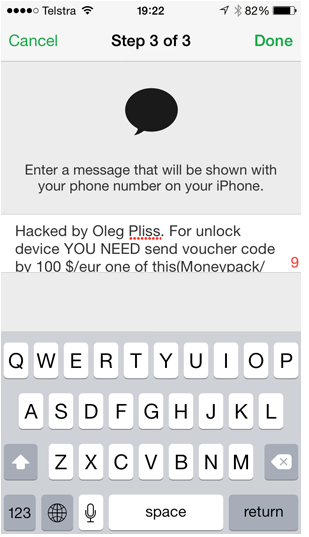
And just one month ago in late May 2014, we saw the first mass ransomware occurring on iOS, with thousands of users locked out of their phones until they paid a ransom demanded by someone called “Oleg Pliss” who demanded $100 to unlock the device.
The Avira app is an app just like the others on iOS and due to sandboxing it can not directly scan the apps in the other sandboxes as it can not access them. However, importantly, every time an app is opened it executes a process, which identifies it to the operating system. The Avira app’s malicious process scanner can see all the current running processes on the device which is information supplied directly by the OS (every app has it’s own unique identifiable processes). From that information Avira can tell if there is a malicious application open on your device by comparing it with our malicious process dictionary, as the application’s running processes identify it.
As well as the malicious process scanner, the Avira app “Find my Phone” feature will help you locate any of your of your family’s iOS or Android devices, and the “Identity Safeguard” feature will also let you know if your personal details have been caught up in any security breaches that could lead to your identity being stolen and you defrauded.
One last thing. The new version of iOS, known as iOS 8 arrives in the fall, which (amongst thousands of new changes to the OS which are yet to be fully tested by developers), brings a new feature known as “extensibility”. This is the ability for applications to start reaching outside of their sandboxes and talking to each other using so-called “extensions” to reach across. Sandboxes won’t be such lonely places after all! iOS is evolving, and so are the threats. Avira iOS mobile security will be there to keep you safe!

Avira Antivirus for Android, another perfect score

(I originally wrote this post for publication on http://blog.avira.com)

For the fifth time in a row Avira Free Antivirus for Android has earned the highest possible rating in a bi-monthly test series conducted by reputed and independent AV-TEST security institute.
winning-streak

July Test Summary

In the current test, Avira Free Antivirus for Android was pitched against 28 competing products and 2627 malicious applications which were newly discovered by AV-TEST in the current testing period.
Just like in the previous four tests, our free Avira Antivirus for Android delivered a perfect 100% detection rate on the Android malware test set, not even missing a single malicious app. This means another solid 6 out 6 possible points purely for the detection capabilities of our app.
In addition to the raw detection rates, AV-TEST also considers usability an equally important factor in the tested products. Of the 13 achievable points in the test, 6 are reserved for various performance metrics, false positives and update sizes. Zero false positives and no hiccups in any of the benchmarks granted us another perfect score of 6 out of 6 possible points.
The rest of the 13 possible points we received for the other important security-related features in the app, like Anti-Theft functionality and call blocking.
android-july

Behind the Numbers

Our passion at Avira is to give our users the ability to focus on what is really important in their lives, without having to worry about their digital safety. To this end we continuously dedicate our efforts to provide them with the best security solutions available on the market.
Subsequently receiving test results with perfect scores proves that we can sustain high detection rates over a longer period of time without a negative impact on user experience.
This is only possible with rock-solid technology, as well as all the right processes and people in place to discover, classify and detect new malicious applications. Doing well once on a specific set of samples will not automatically carry over to the next testing period, as no malware file is ever being used twice by the testing organization.
Our growing installation base of several million active users further underlines that users trust in our ability to cover their security needs in the mobile space.

Want more?

If you want even more protection than already offered by our free Android app, consider upgrading to the paid version which adds the blocking of malicious websites and protects you against phishing attacks.

Breached Credentials lead to cyber fraud at Ebay’s Stubhub


Breached Credentials lead to cyber fraud at Ebay’s Stubhub

Last week US authorities broke up what they described as a “global cybercrime ring” and arrested 6 men in connection with a scam that has defrauded eBay’s Stubhub ticketing business of over $1m.
studhud-breach

Last week more than 1600 user accounts at Stubhub had their accounts compromised and their credit cards used to purchase tickets without their knowledge. Each user was defrauded an average of $625. It is the second breach at eBay this year. This time the cybercriminal gang compromised the user accounts without directly getting access to Stubhub’s servers. Instead they accessed the accounts using publicly available user credentials from recent security breaches.
“These legitimate customer accounts were accessed by cybercriminals who had obtained the customers’ login and password either through data breaches of other websites and retailers, or through the use of key-loggers and/or other malware on the customer’s own PC” authorities announced at a press conference. It highlights the dangers of users using the same username and password across multiple websites, some of which are storing their credit card details. This is another example of user’s not realizing the importance of updating their passwords and account details on a regular basis, and immediately after their details are compromised in any security breach.
Avira users can check to see if their credentials have been compromised in any recent security breaches by using the Identity Safeguard checker inside theAvira iOS and Android apps that are available for free on the Playstore and Appstore. Please check today and avoid becoming another next victim of cyber fraud!